VidMage AI is a face-swapping app that lets you swap faces in photos, videos, and GIFs, and even live on video calls. Its native Mac version runs offline on Apple Silicon, so your files stay on your device. It has a simple drag-and-drop interface, supports up to 4K export, and offers extras like multi-face swapping and a Facial Feature Mask that lets you replace only the eyes, nose, or lips.
VidMage AI app is one of the useful apps if you need an offline and native face-swapping app for macOS. It delivers fast and has the drag and drop ability to instantly import your desired images.
It also showcases an impressive feature like real-time face-swapping while you are on a video call or in a meeting. For this, you can just enable its native camera extension from your macOS settings. Then you can use it with any apps like Zoom, OBS Studio, FaceTime, or WhatsApp. However, this feature is only for premium subscribers and can be tried only for 3 minutes as a free user.
Features According to the Developer
This native macOS face-swapping app supports multiple formats, like MP4, MOV, JPG, PNG, WEBP, and GIF. It runs local AI using M-chip neural engines and matches expression retention, lighting, and frame-by-frame motion tracking. Using this AI, you can export up to 4K resolution. However, for free users, you may see watermarks, and for paid users, there will be no watermarks.
By using its native camera extension, you can swap your face in real time during live streaming or video calls. Not only that, you can even switch the targeted face in mid-stream.
You can swap up to 4 faces in a single photo or video clip. Also, it has the ability to swap only eyes, nose, lips or the full face. It’s up to you whatever you want.
Interface
VidMage has a very easy-to-use GUI interface that doesn’t need any kind of Terminal, Python, or cloud uploads.
I have split the interface into two parts. One is the installation interface, and another one is the in-app interface. So that I can give you a thorough review of this face-swapping app.
Installation Interface
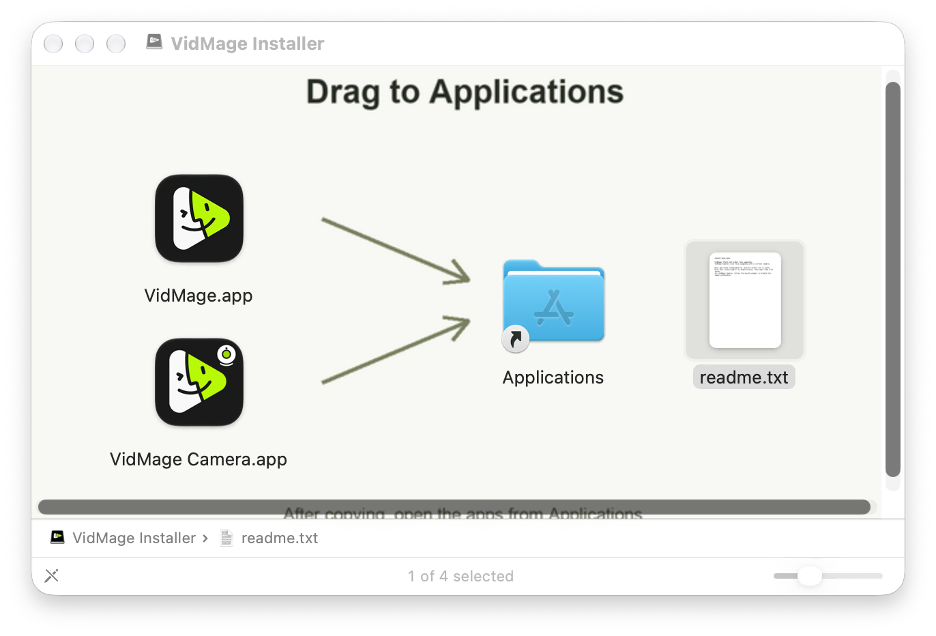
When I opened the installer of VidMage, I found two apps in its .dmg file instead of one. First, I was a little bit confused and opened the readme.txt file that was included in the .dmg file. After reading that, I came to know that both apps work separately (I thought I might need to install both to run properly).
One is a face-swapping app for photos and pre-recorded videos. Another one is for the live camera.
So, it might be a little confusing at first, but they really did a great job by adding that readme.txt file, which clears up the confusion.
In-App Interface
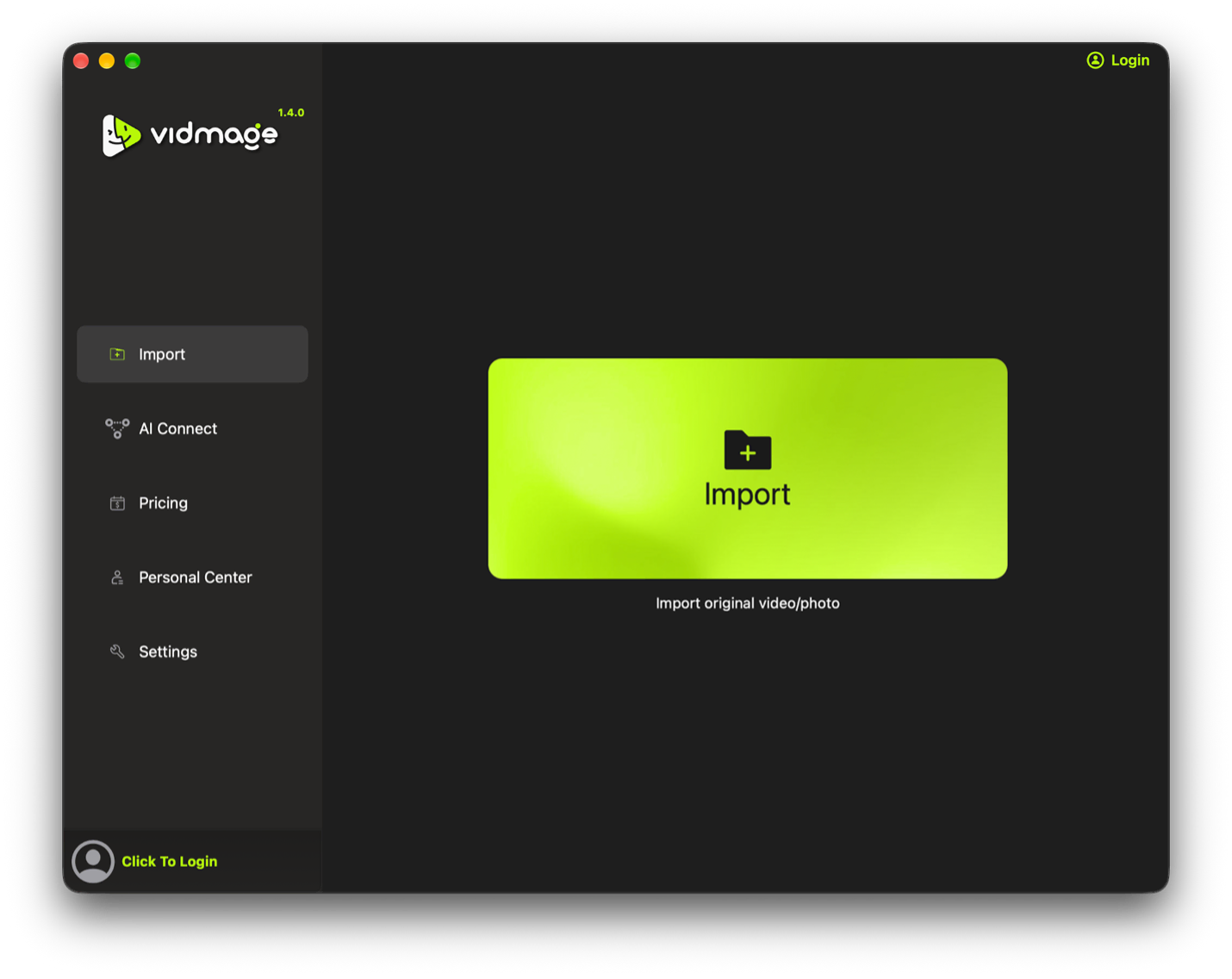
The interface of the VidMage app is very simple. After opening the app, you will find a window something like the screenshot below. Here you will see 2 sections. The navigation and the details section. The first thing in the navigation you will find “Import”. Here you can import your images and videos for swapping faces.
The second one is “AI Connect”. Here you can connect other AIs like Codex, Cursor, Claude, and so on. However, to use this feature, you need to subscribe to its premium version.
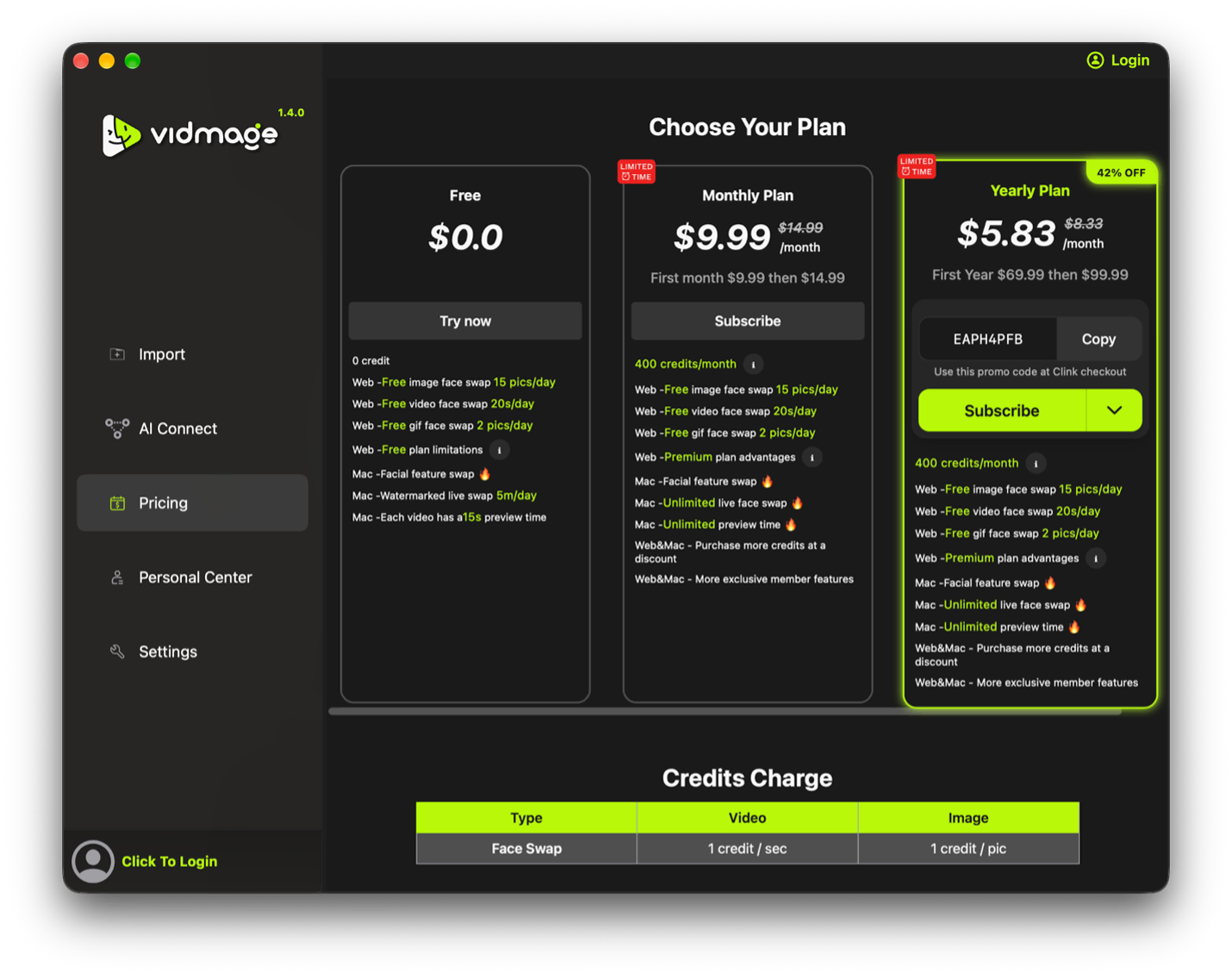
The third one is Pricing. Here you can choose the subscription plan that you need, or you can just continue with the free plan, which has some limitations.
The fourth one is “Personal Center”; here you can log in to your VidMage Account using your email or your Gmail account. While reviewing this section, I found a short note at the top of the section saying that the Google account and the email account will be considered different accounts. It bothered me a little because I personally sometimes use email and sometimes use Google to log in to those sites which have this kind of feature. However, if you don’t do that, then it shouldn’t be an issue for you.
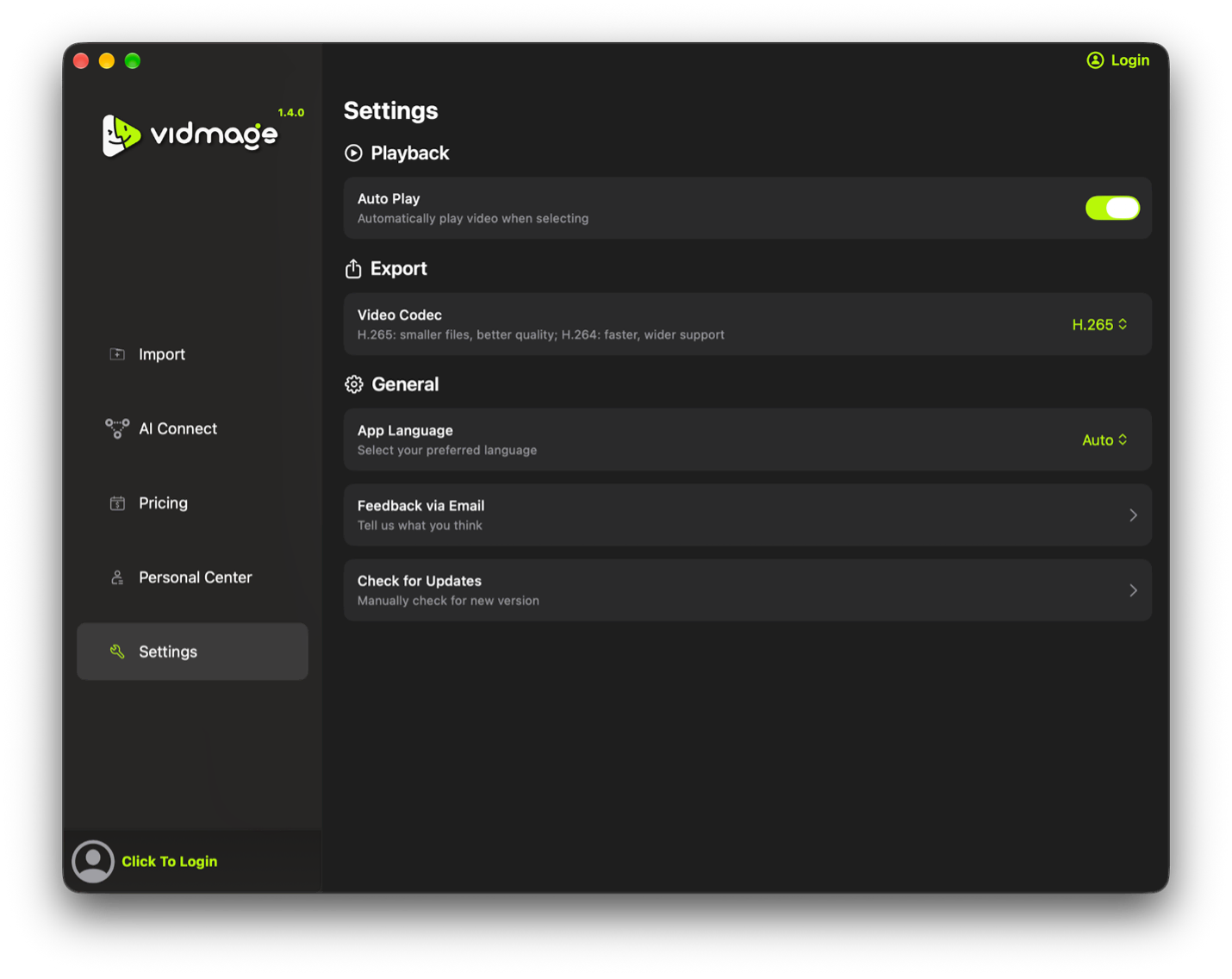
The fifth and last one is the App settings option. Here you can customize your app as you want, like playback settings, export settings, and general settings.
Face Swap Interface
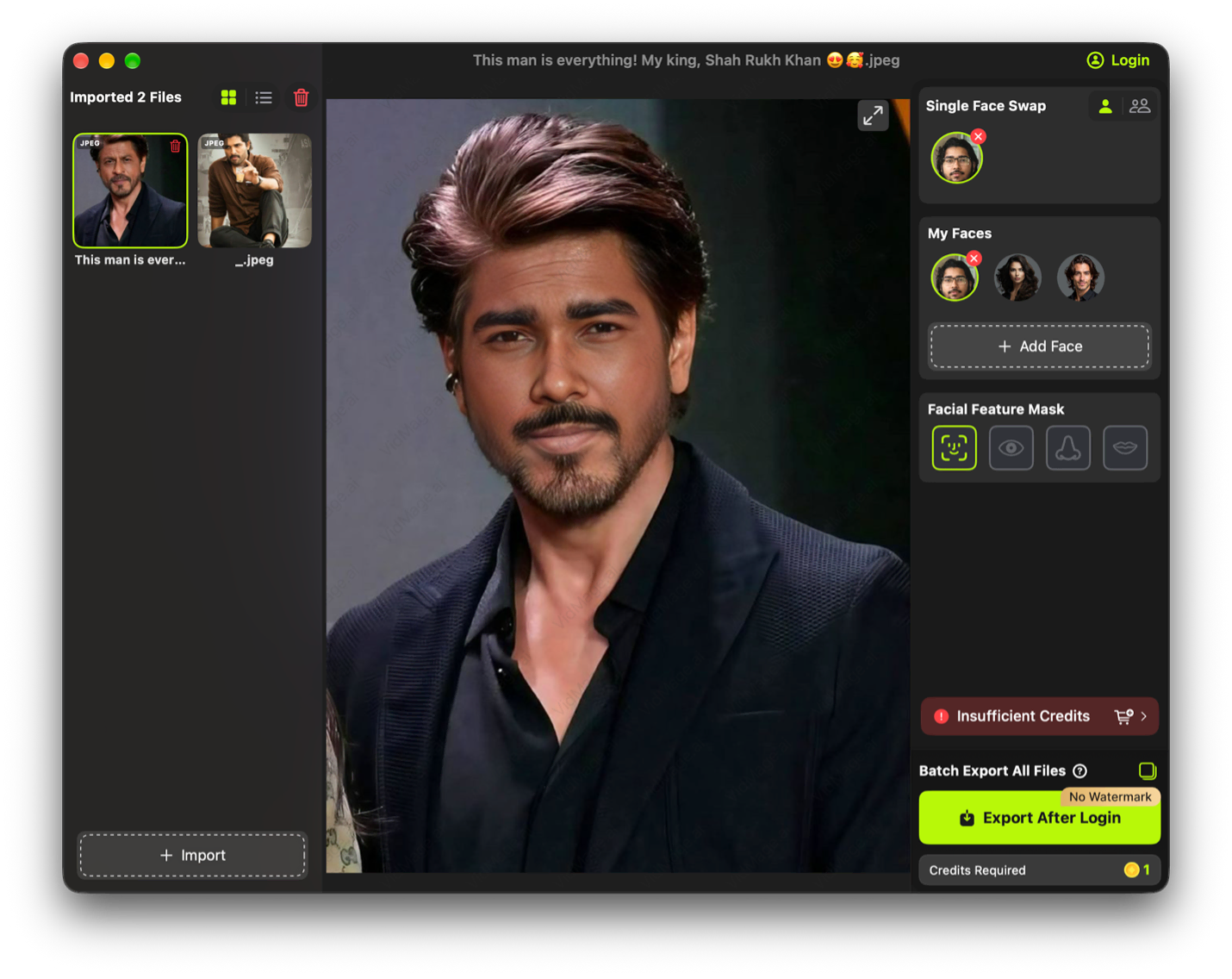
When you import any photo, you will find an interface like the screenshot below. This part has 3 panels.
In the left panel, you will find all the imported images, which also allow you to switch from one image to another, which is really helpful.
The center panel showcases the real-time output of your selected photo and customizations.
The right panel showcases the customization options, such as single face swap or multi-face swap, imported faces, facial feature masks, and the export button.
Here I found 2 things that I loved most. One is that I can store multiple faces and can switch between each of them and instantly can get the result. Another one is the Facial Feature Mask option. It allows you to customize whether you want to change the full face or only some part of the face, like eyes, nose, or lips. Many of its competitors don’t have this kind of feature. So, it’s really great to have it if some of you don’t need to swap the full face but a specific part.
Resource Usage
For this test, we have used:
Model: MacBook Pro M5 Pro
CPU/GPU: 15 Core / 16 Core
RAM: 24 GB
We tested the application with the internet connection disabled for the offline test and used the same source images when comparing results with other face-swapping tools. Performance was monitored through macOS Activity Monitor. We tested photo face swapping, video face swapping, multi-face swapping, and facial feature masking. The version tested was 1.4.0, running on macOS 27.0.1 Golden Gate.
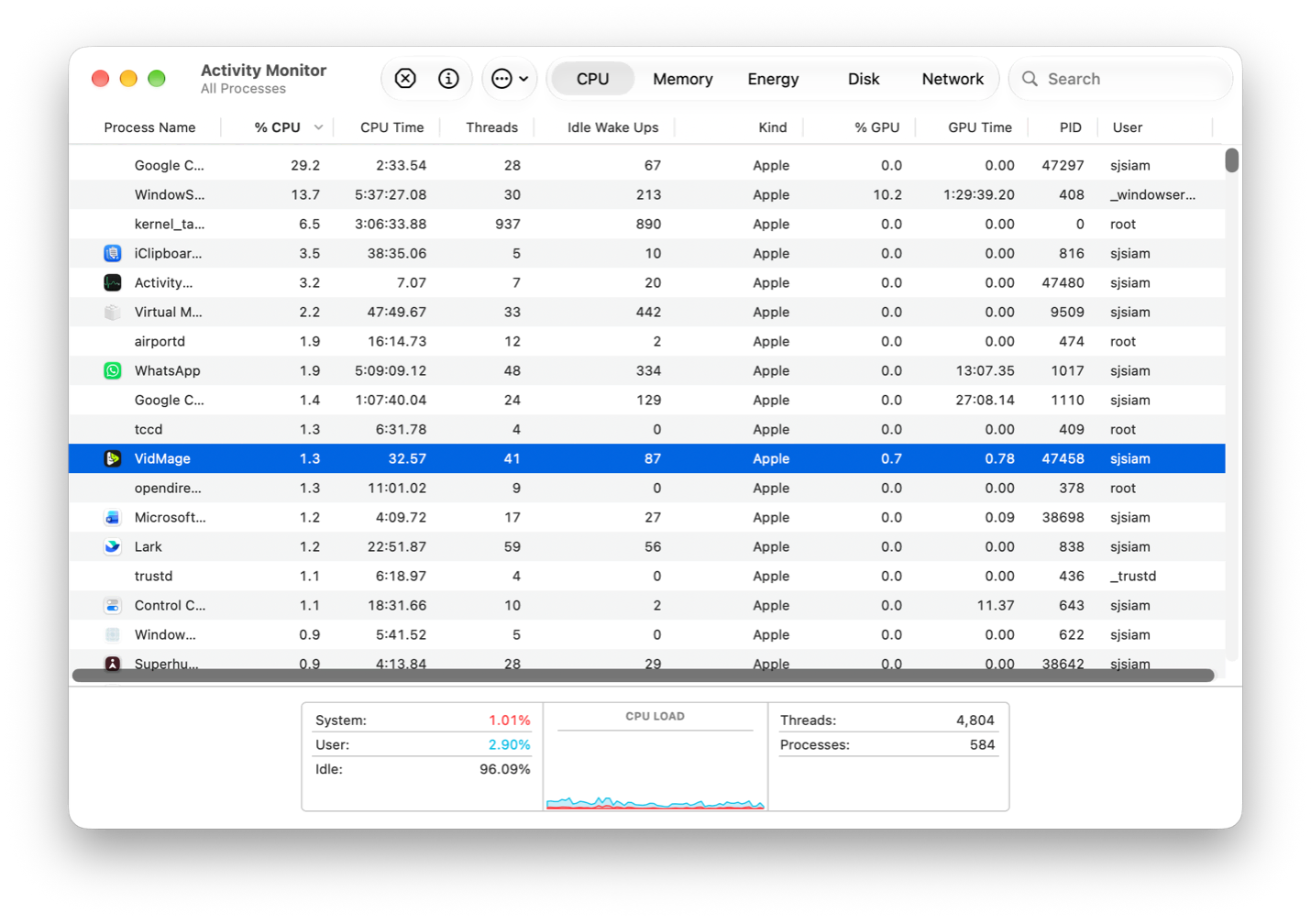
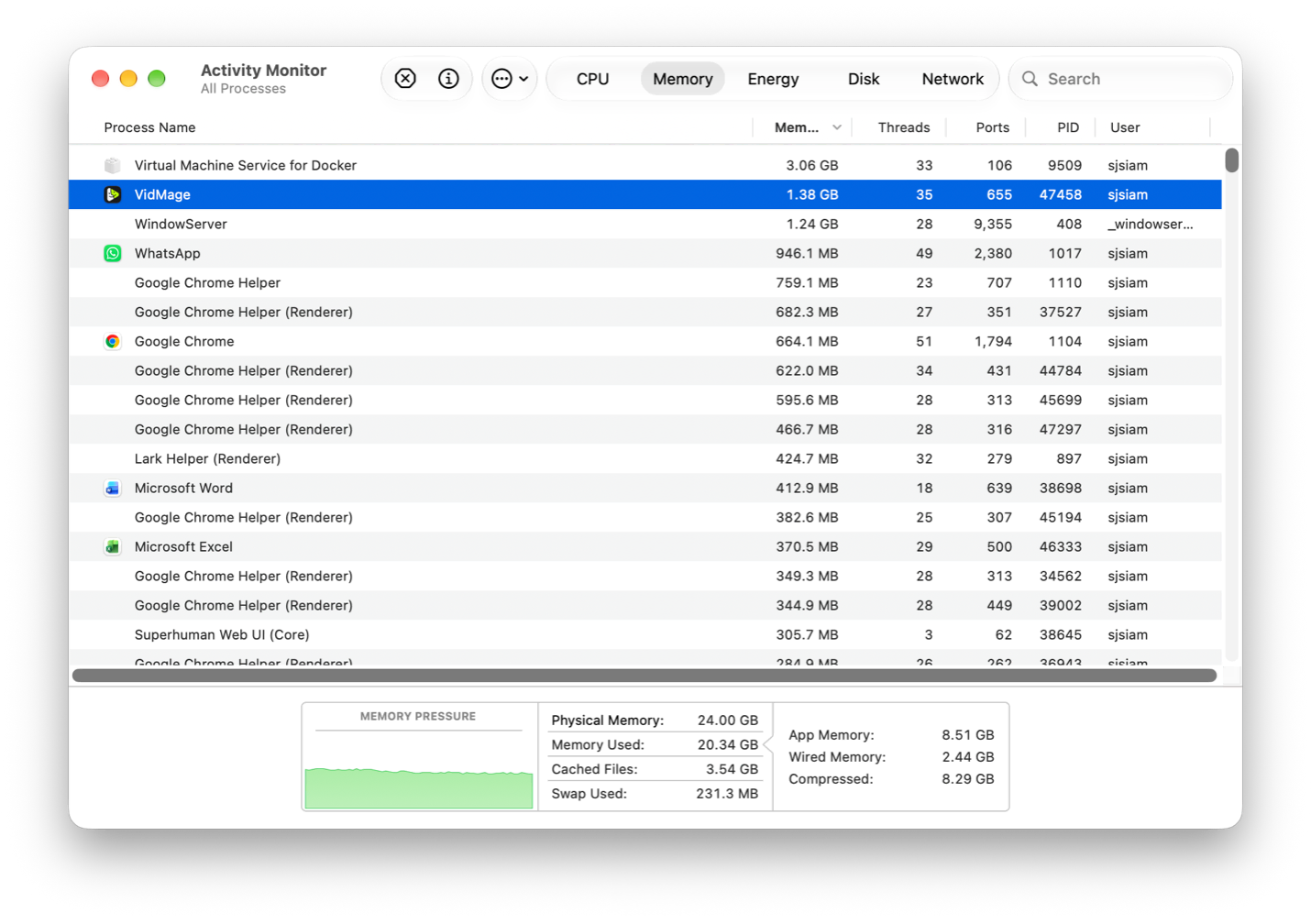
At first, we tested the CPU usage when the VidMage AI was idle. At that time, it was using 1.3% of CPU and 1.38 GB of memory.
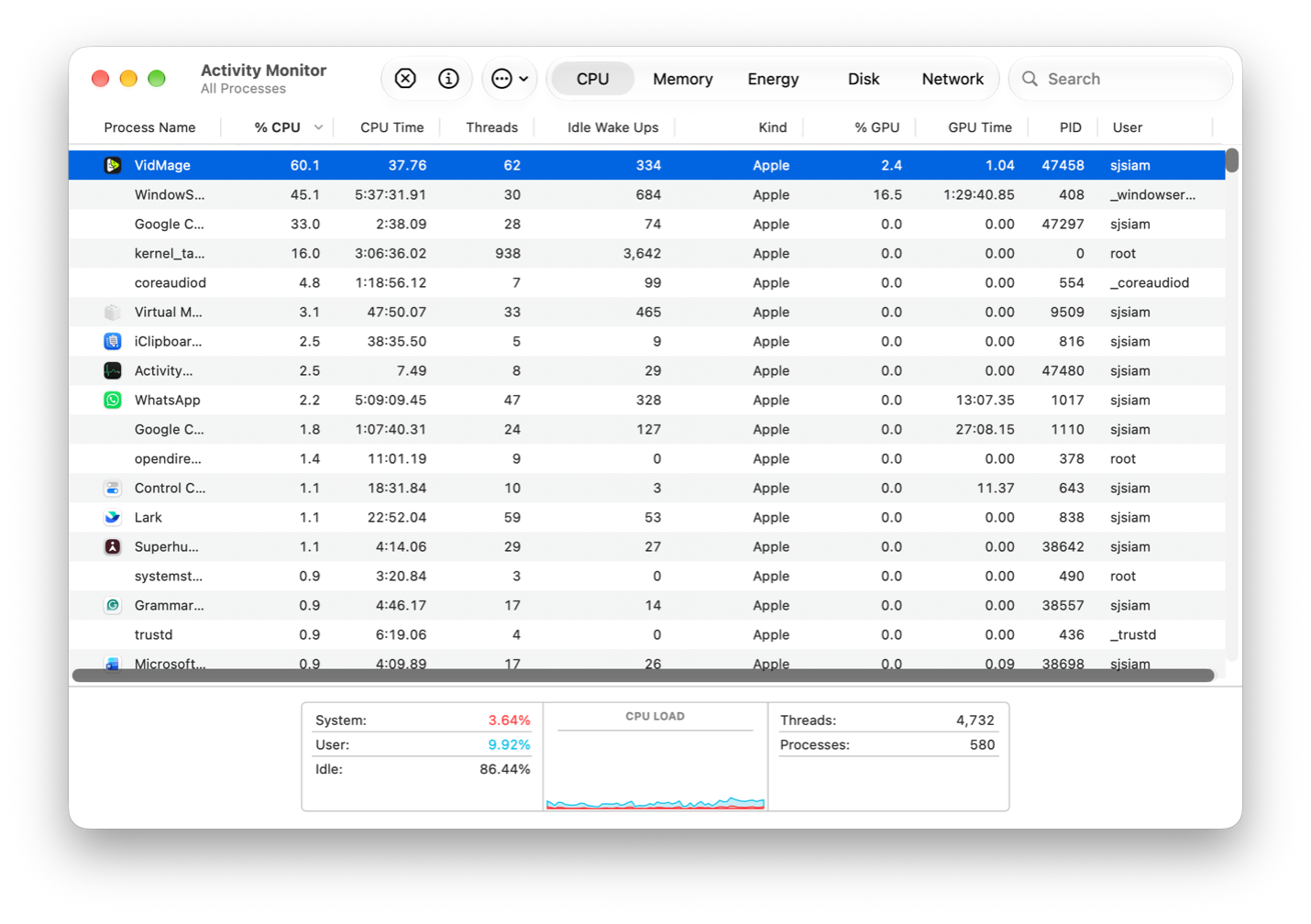
Then we tried to swap a face from images and videos using VidMage AI, and we saw a huge spike in CPU usage. It was using 60.1% of the M5 Pro chip, and the memory usage was the same as before. This result was almost same for face swap from images and videos.
Face Swapping Accuracy
Now, we are going to talk about the actual functionality of this app. For this, I have used my own face and Shahrukh Khan’s image.
You can see the output in the image below. As you can see, the accuracy is somewhat okay. But I think it should have been more accurate.
So, I tried using some of its competitors’ apps to check their results. Like AIFaceSwap.io and MagicHour.ai (I searched Google for “AI Face Swap” and got these two results at the top and used them. We are not affiliated with these companies in any way). AIFaceSwap.io showed us more accurate results than VidMage, but for MagicHour, VidMage had more accuracy than it.
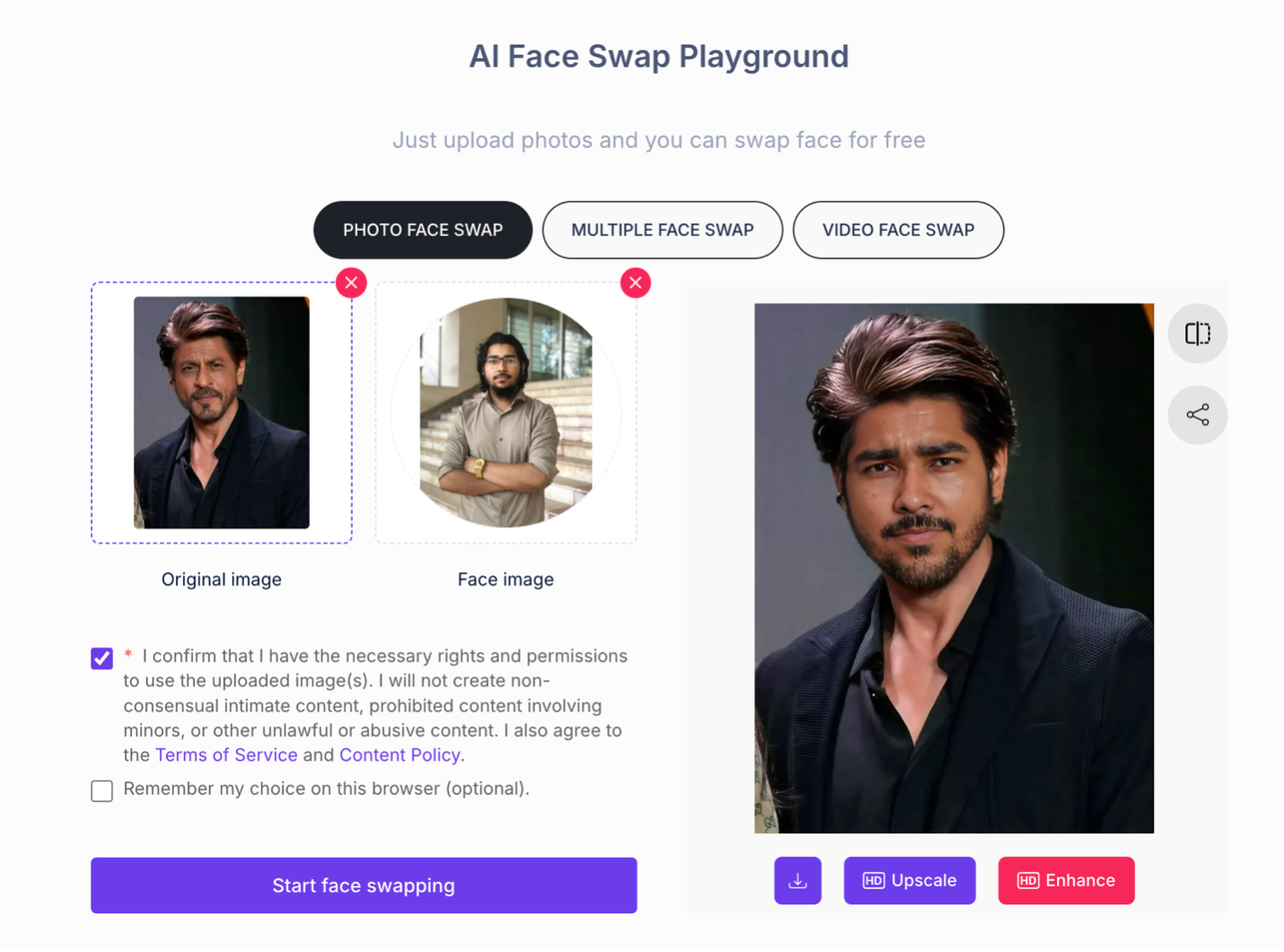
For a more in-depth test, we also tested VidMage’s online face swap app also and here you can see the result:
I was really amazed by the result because their web version has a more accurate result than its native macOS app.
Here you can see the our testing results at a glance:
Test
VidMage
AIFaceSwap
MagicHour
Identity preservation
4/5
5/5
3/5
Hair/edge blending
3/5
4/5
3/5
Expression preservation
4/5
4/5
3/5
Lighting consistency
3/5
4/5
3/5
Overall
3.5/5
4.25/5
3/5
Privacy Concerns
While testing those tests above, we had turned off our WIFI and other internet connections to check whether it really works offline and locally. The answer was “YES”. It really worked without an internet connection, without any issues.
So, if you have any privacy concerns, you can use this app with peace of mind. It works completely offline and locally, unlike online face-swapping apps or CLI tools like FaceFusion and DeepFaceLab.
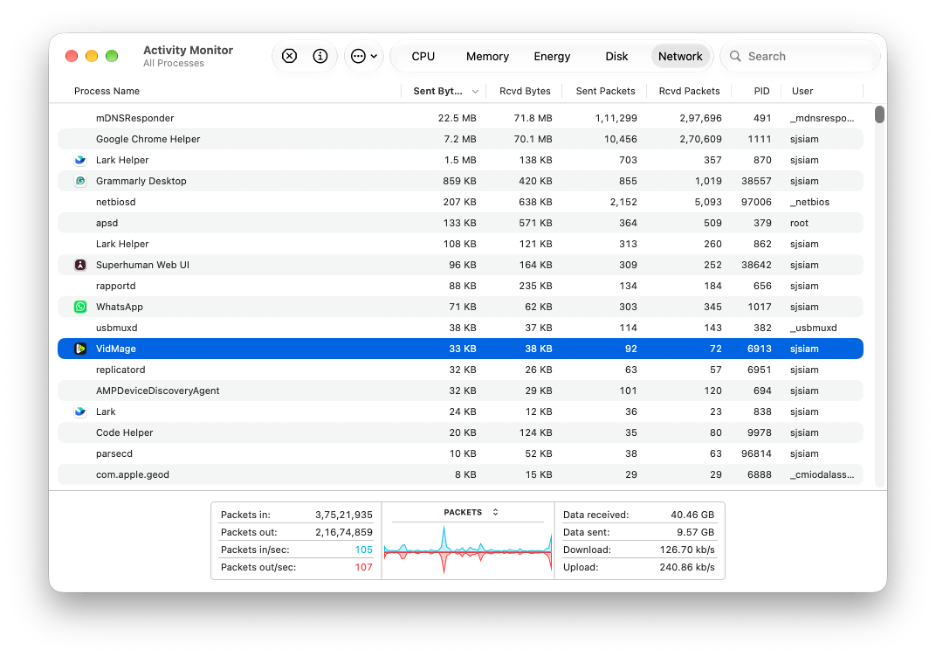
To ensure this more accurately, we have used the Activity Monitor’s Network section to see if it is sending any data to the internet when uploading photos or videos. We have uploaded a 24MB video clip and then checked the Activity Monitor for updates. From our analysis, we have confirmed that this app is not sending your uploaded videos or photos. But it still sharing some data which most likely can be:
· An authentication check or license validation.
· Basic analytics or telemetry
Responsible Use
Face-swapping technology can be used for entertainment and creative projects, but users should have permission to use other people's images and should avoid presenting altered media as genuine when doing so could mislead or harm someone.
Comparison with its Competitors
To see where VidMage stands, I compared it with the apps we already used in the accuracy test, along with other face-swapping tools available today.
AIFaceSwap.io and MagicHour.ai: These are online tools. In our test, AIFaceSwap.io gave us a more accurate result than VidMage's macOS app, but VidMage was more accurate than MagicHour. Their biggest drawback is that you have to upload your photos and videos to their servers, which isn't great if you care about your privacy. VidMage doesn't have this problem because everything happens on your Mac.
FaceFusion and DeepFaceLab: These are CLI tools, so you need to be comfortable with Terminal and Python before you can even start using them. They can be powerful, but the setup is not beginner-friendly. VidMage is the opposite. You just open the app, drag and drop your images, and you are ready to go. It also has a real-time camera extension for Zoom, OBS, FaceTime, and WhatsApp, which is hard to get with those tools.
VidMage's Web Version: Surprisingly, VidMage's own online face swap app gave us a more accurate result than its native macOS app. So, if accuracy is your top priority and privacy is not a concern, you may want to try the web version.
Feature
VidMage
DeepFaceLive
Swapface
Magicam
Deep-Live-Cam
Mac / Apple Silicon native
Yes
No (Windows only)
Yes
Yes
Partial
Local / no cloud upload
Yes
Yes
Partial
Yes
Yes
No technical setup required
Yes
No (Python/CUDA)
Yes
Yes
No
Works with Zoom and FaceTime
Yes
Limited
Yes
Yes
Limited
OBS virtual camera support
Yes
Yes
Yes
Yes
Yes
Switch faces mid-session
Yes
No
Yes
Yes
No
Facial feature-level swap
Yes
No
No
No
No
Free to start
Yes
Yes (open source)
Freemium
Freemium
Yes (open source)
Comparison note: Feature availability was checked against the respective applications' current documentation and our testing where applicable. Features and pricing may change over time.
Where VidMage really stands out from most of its competitors is the Facial Feature Mask. Many apps can only swap the full face, but VidMage lets you swap only the eyes, nose, or lips. Along with that, you can swap up to 4 faces in a single photo or video and export in up to 4K.
To whom we recommend it
We recommend VidMage AI to these types of users:
Streamers and video callers: If you want to swap your face live on Zoom, OBS, FaceTime, or WhatsApp, the native camera extension makes this really easy. Just keep in mind that you need the premium plan, as free users only get 3 minutes.
TikTok/Reels creators: The drag-and-drop import, multiple saved faces, and 4K export make it quick to create fun content without any complex setup.
Privacy-conscious Mac users: For users concerned about uploading face images to cloud-based processing services, the local workflow is useful because our face-swapping test continued to work with the internet disabled.
Beginners: If you find tools like FaceFusion or DeepFaceLab too complicated, VidMage is a much easier alternative with a simple GUI.
However, if you need the most accurate result possible and don't mind uploading your files online, then you might want to look at other options or try VidMage's web version instead.
In Conclusion
Based on our testing, VidMage's biggest strengths are its simple macOS interface, local processing capability, facial feature masking, and real-time camera support. Its native face-swapping accuracy was not consistently the strongest in our comparison, although the application was easier to set up than command-line alternatives. For users who prioritize a native Mac workflow and local processing, it is an interesting option; users who prioritize maximum face-swapping accuracy may want to compare its results with the web version and other services.
MD Shahariar Jaman Siam is the CEO and the founder of Fileion.Com & NearFile.Com.
2
Followers
3
Following
CEO
MD Shahariar Jaman Siam is the CEO and the founder of Fileion.Com & NearFile.Com.
FAQs
Frequently Asked Questions
Yes. We turned off our WiFi and other internet connections during testing, and the face-swapping still worked without any issues. Please note that some features, like logging in to your account or checking your subscription, may need an internet connection.
In our testing, the app did not send our uploaded photos or videos to the internet. We checked this using the Network section of Activity Monitor while uploading a 24MB video clip. However, the app still shared some data, which is most likely an authentication check, license validation, or basic analytics. So, it keeps your face data local, but it doesn't completely stop communicating with the internet.
No, VidMage AI is only available as a native macOS app, so there is no Windows version of the desktop app. However, Windows users can still use VidMage's web version in their browser. Just keep in mind that the web version works online, so your photos and videos will be uploaded to the cloud, unlike the offline macOS app.

-p6UL3AcG.jpg?q=100&w=48&s=e57938d467dcdeea201142bd05592d6d)





-p6UL3AcG.jpg?w=70&s=b80e074110e7733cc90ee7e21579c02e)
-p6UL3AcG.jpg?q=100&w=70&s=e1e40ff373cde0719d253e4c908ba38b)